INTERNATIONAL FLUID POWER, INC.

The Experts for Hydraulic Power Units, Components, and Custom Hydraulic Systems
Slider

How to Choose the Right Embedded Computer for Your Business

Choosing the right Embedded Computer can shape your product’s reliability, cost, and service life. The decision reaches far beyond processor speed. It affects installation space, heat management, software support, and future upgrades. A compact control box may run quietly for years, while a poorly matched unit can overheat beside a factory motor.

Jim Turley, a longtime embedded-systems analyst, described the concept clearly: “An embedded system is a computer system that is hidden inside another product.” That hidden role demands careful judgment. Buyers should examine processing requirements, operating temperature, vibration resistance, connectivity, storage, and power consumption. They should also confirm whether the supplier offers long-term availability and technical assistance. A low purchase price is not always economical. Replacing thousands of units later can cost far more.

Real deployment conditions matter most. Measure the enclosure, inspect the airflow, and test the computer with actual peripherals. A laboratory benchmark may look impressive. It may not represent dust, vibration, or unstable network connections. Businesses should request lifecycle information, security updates, and repair procedures before signing a purchase agreement. Certification needs can vary by industry and region, so qualified specialists should verify them.

There is no perfect specification sheet. I have seen teams overvalue performance and overlook maintenance access. That mistake is easy to make. The better approach connects technical choices with business risks, staff skills, and planned growth. This guide explains how to compare Embedded Computer options with practical evidence, realistic constraints, and room for honest reassessment.
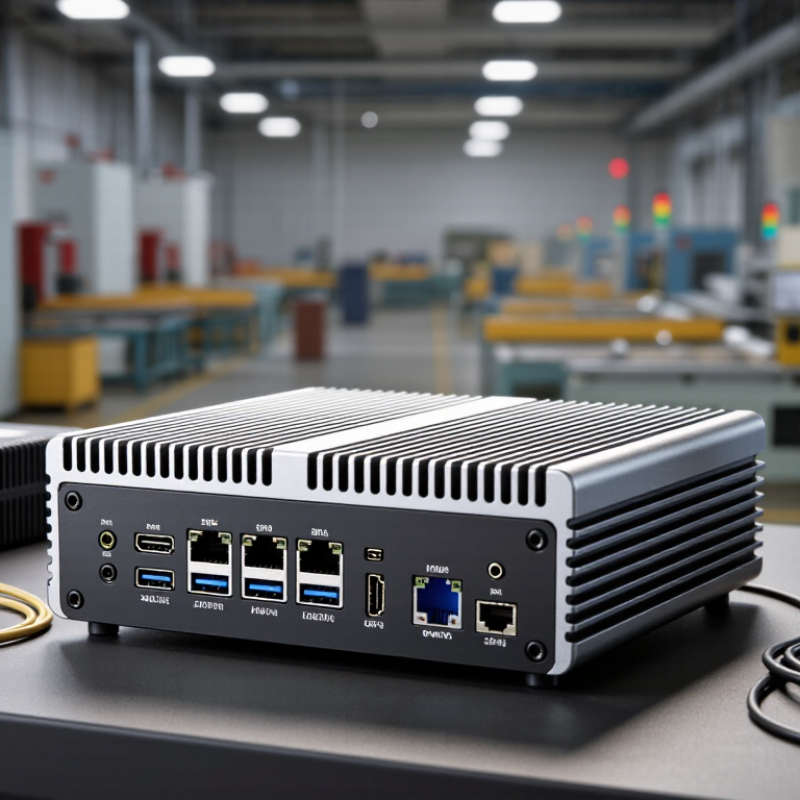
How to Choose the Right Embedded Computer for Your Business

Define Your Business Requirements and Operating Environment

Choosing an embedded computer begins with the business task, not the processor. Define required workloads, response times, storage, connectivity, and service life. IoT Analytics reported approximately 18.8 billion connected IoT devices worldwide in 2024, increasing pressure on edge systems to process data locally. Your system may need to filter camera feeds, control motors, or maintain records during network interruptions. Write these scenarios down.

The operating environment can change the decision quickly. Measure ambient temperature, humidity, dust, vibration, shock, and available power at the installation site. Dust matters. Heat compounds. The Uptime Institute’s 2024 Global Data Center Survey found that many reported outages still create financial consequences below 100,000 dollars, but smaller failures can interrupt production severely. Select suitable thermal management, enclosure protection, storage durability, and remote monitoring capabilities. Also check regional electrical and safety requirements before deployment.

Security and maintenance deserve equal attention. The National Institute of Standards and Technology recommends asset inventories, controlled updates, secure configuration, and recovery planning for operational technology. These practices should shape the computer’s design from day one. I would not pretend every requirement is knowable initially. Field conditions often expose weak assumptions, especially around cable strain and unexpected temperature peaks. A pilot installation can reveal those gaps before a full rollout. Test with real workloads, real peripherals, and realistic downtime scenarios. A specification sheet alone is not enough.

Assess Processing Power, Memory, Storage, and Expansion Needs

Choosing an embedded computer starts with the workload, not the processor label. A vision system may need sustained CPU or GPU performance, while a control panel may need only modest computing power. IoT Analytics reported 18.8 billion connected IoT devices worldwide in 2024. That scale increases pressure on local processing, especially when cloud connectivity is delayed or unavailable.

Test real workloads before buying. Measure response time while sensors, displays, encryption, and data logging run together. Memory should support the operating system, applications, and temporary buffers without constant swapping. I usually leave 25% to 40% unused memory for software updates and unexpected peaks. This is not a strict rule, but it prevents painful redesigns. IDC’s Worldwide Edge Spending Guide projected global edge spending to reach about $317 billion in 2026, showing why local capacity deserves careful planning. Storage also needs attention. Estimate daily data, retention time, write cycles, and temperature exposure. A large drive can still fail early when continuous logging creates excessive write activity.

Tips: Create a simple load table before selecting hardware. Record CPU use, memory use, storage growth, and temperatures during the busiest shift. Choose expansion options for actual needs, such as serial ports, industrial networking, digital I/O, or removable storage. Avoid paying for every possible interface. I have seen teams overbuy expansion, then discover that thermal limits reduce performance. That mistake is easy to miss. Recheck it.

Compare Connectivity, Compatibility, and System Integration Options

How to Choose the Right Embedded Computer for Your Business

Connectivity should match the machine, not merely the product brochure. IoT Analytics’ State of IoT—Spring 2024 estimates 18.8 billion connected IoT devices worldwide in 2024. That scale makes dependable interfaces essential. Ethernet suits fixed equipment and stable data transfer. Wi-Fi reduces cabling but may struggle near motors, metal, or crowded networks. Cellular connectivity supports remote assets, although subscription costs can surprise finance teams.

Compatibility needs a physical and software checklist. Confirm voltage ranges, connector types, operating temperature, processor architecture, and available drivers. Then test CAN, RS-485, USB, MQTT, or OPC UA with the actual sensors. A device that communicates in a laboratory may fail beside electrical noise. It happens. The Industrial Internet Consortium’s Industrial Internet Reference Architecture emphasizes interoperability, security, and lifecycle planning across connected systems.

System integration deserves equal attention. Check whether the computer supports secure boot, hardware encryption, remote monitoring, and controlled firmware updates. NIST’s Cybersecurity Framework 2.0 stresses asset identification, protection, detection, response, and recovery. Those functions require practical tools, not attractive specifications. Review APIs, container support, cloud gateways, and existing PLC or SCADA connections before purchasing. Leave expansion ports and memory headroom. My own design reviews often find that a small connector decision creates months of redesign. Cost matters, but integration labor, downtime, and future maintenance usually matter more.

Evaluate Reliability, Security, Maintenance, and Lifecycle Support

Choosing an embedded computer starts with the environment, not the processor. Check operating temperatures, vibration, dust, humidity, and unstable power conditions. A factory floor may expose weaknesses that laboratory tests never reveal. Look for watchdog timers, error logging, protected storage, and recovery after sudden power loss. Reliability is practical. It appears in fewer service visits and less unexpected downtime.

Security must continue after installation. Select systems that support secure boot, signed firmware, encrypted communication, and separate user permissions. Ask how vulnerabilities are reported and how quickly patches are released. Maintenance also deserves close attention. Clear diagnostics, remote monitoring, replaceable storage, and accessible connectors can reduce repair time. Yet, I have seen teams overvalue technical specifications and underestimate cable fatigue, dust buildup, and operator mistakes.

Tips: Request real environmental test data, not vague performance claims. Confirm the expected service life and spare-part availability in writing. Review the update process with your maintenance team before purchasing. Ask whether software changes can be tested on a separate unit. Build a small pilot system and record failures honestly. A perfect test plan does not exist. The best choice supports measured improvement, documented responsibilities, and dependable lifecycle assistance.

How to Choose the Right Embedded Computer for Your Business - Evaluate Reliability, Security, Maintenance, and Lifecycle Support
Evaluation Dimension Suggested Weight Business Requirement Recommended Acceptance Criteria How to Verify Business Risk if Insufficient Priority
Reliability and Availability 20% Stable operation in continuous-use environments with minimal unplanned downtime. Documented operating temperature range; industrial-grade components where required; watchdog timer; power-loss recovery; validated mean time between failures or equivalent reliability evidence. Review qualification reports, environmental test results, failure data, burn-in procedures, and warranty terms. Production interruptions, service calls, data loss, and higher total operating cost. High
Environmental Durability 12% Correct performance under the actual temperature, humidity, vibration, dust, and electrical conditions. Operating specifications match the installation site; appropriate ingress protection; resistance to vibration and shock when mobile or machinery-mounted; fanless design where dust or maintenance access is a concern. Compare site measurements with the product specification and request relevant IEC 60068 environmental test evidence. Thermal throttling, corrosion, premature failure, and unexpected shutdowns. High
Cybersecurity 18% Protect operational data, applications, and connected systems from unauthorized access and tampering. Secure Boot; hardware-backed key storage such as TPM 2.0 where supported; signed firmware; role-based access; security update process; disablement of unnecessary ports and services. Request a security architecture, vulnerability disclosure process, patch policy, software bill of materials, and independent security test evidence. Unauthorized control, ransomware exposure, compliance issues, and reputational damage. High
Performance and Expandability 12% Run the intended workload reliably while allowing reasonable future expansion. Processor, memory, storage, graphics, and network capacity exceed measured workload requirements; required interfaces are built in or available through documented expansion options. Run representative application benchmarks, measure peak utilization, and confirm interface compatibility with production equipment. Slow response, inability to add features, premature replacement, and integration delays. Medium
Maintenance and Serviceability 12% Reduce the time and skill required for diagnosis, repair, replacement, and software maintenance. Remote monitoring; diagnostic logs; accessible storage and memory where appropriate; clear replacement procedures; image backup and restore capability; documented spare-part process. Perform a maintenance trial, review manuals, test remote recovery, and measure estimated mean time to repair. Longer outages, higher labor costs, and dependence on specialized technicians. High
Lifecycle and Availability Support 14% Keep the installed system supportable for the planned deployment period. Written product availability commitment; controlled revision policy; advance-change notification; long-term operating-system and firmware support; compatible replacement or migration path. Obtain lifecycle documentation, end-of-sale notice periods, last-time-buy rules, and support escalation contacts in writing. Forced redesigns, requalification costs, software incompatibility, and supply disruption. High
Integration and Manageability 7% Integrate efficiently with existing networks, applications, control systems, and fleet-management tools. Required protocols and drivers are supported; remote configuration and asset inventory are available; time synchronization, logging, and authentication fit the existing IT or OT environment. Build a proof of concept using production interfaces, network policies, authentication, and management workflows. Integration delays, manual administration, configuration errors, and higher deployment costs. Medium
Total Cost of Ownership 5% Evaluate the complete cost over the deployment lifecycle rather than purchase price alone. Include hardware, software licenses, installation, energy use, maintenance, spare units, security management, training, downtime, and eventual replacement. Compare a three-to-seven-year cost model using documented prices, service assumptions, energy requirements, and replacement intervals. Budget overruns and an apparently low-cost system becoming expensive to operate. Medium
Recommended Decision Method Score each criterion from 1 to 5, multiply by the suggested weight, and require mandatory cybersecurity, environmental, and lifecycle requirements to pass independently.
Scoring guide: 1 = unacceptable, 2 = significant gaps, 3 = meets minimum requirements, 4 = strong fit, 5 = exceeds requirements with documented evidence. Weights should be adjusted to reflect the application’s safety, uptime, regulatory, and deployment priorities.

Select the Best-Fit Embedded Computer Within Your Budget

Choosing an embedded computer begins with the budget, not the processor. IDC forecasts worldwide edge computing spending will reach about $232 billion in 2024. That growth reflects a practical shift: more decisions now happen near machines, sensors, and cameras. Your system may need reliable local processing, but the most powerful configuration is rarely the best financial choice.

Calculate total cost over the expected service life. Include memory, storage, operating temperature, enclosure changes, software support, energy use, and field replacement labor. A low-cost unit can become expensive when it needs extra cooling or frequent maintenance. In one factory deployment, a fanless computer reduced dust-related service visits, although its initial price was higher. That result is useful, but not universal.

Start with measurable workloads. Record peak CPU usage, memory consumption, network traffic, and boot time during real operation. Leave practical headroom, perhaps 20–30%, for software updates and demand spikes. IoT Analytics reported 18.8 billion connected IoT devices worldwide in 2024, increasing pressure on local computing infrastructure. Still, projected growth does not justify buying unnecessary capacity. Select industrial temperature ratings only when the installation requires them. Check supplier documentation, lifecycle commitments, security updates, and independent test results. Specifications can look convincing. Real environments are less polite.

How to Choose the Right Embedded Computer for Your Business

Select the best-fit embedded computer by balancing processing capability, energy consumption, and total deployment cost.

Typical power envelopes vary by processor, memory, storage, cooling, and workload. Lower-power systems are often suitable for control, sensing, and simple gateways, while higher-power systems support demanding analytics, computer vision, and artificial intelligence workloads. Compare the required performance, available budget, thermal design, I/O, and product lifecycle before making a final selection.