International Fluid Power Inc.
International Fluid Power - Innovative Partners For Global Sourcing Of Fluid Power Products. Your Complete Hydraulic Source in SE Minnesota.
Choosing an Embedded Industrial Computer is less about finding the most powerful processor and more about matching hardware to the work. Michael Barr, an established embedded-systems author, has written extensively about designing systems around their intended requirements. That perspective matters here. A computer destined for a dusty factory floor has different needs from one installed inside a climate-controlled control cabinet.
A practical maxim for this guide—not a verbatim quotation—is: “Choose for the real workload, not the product brochure.” Small details can decide whether a system performs reliably: a fanless chassis beside a vibrating conveyor, a temperature rating suited to a hot enclosure, or the right serial ports for older equipment. They are easy to overlook. Sometimes, even experienced buyers focus too much on processor speed.
The following seven tips will help you compare performance, interfaces, operating conditions, expansion options, lifecycle support, security, and total cost. Look beyond the specification sheet. Ask how the unit will be mounted, maintained, and connected after installation. A slightly imperfect fit can become an expensive headache, and no checklist removes every uncertainty. Still, careful questions make trade-offs visible before purchase. The best Embedded Industrial Computer is the one that meets proven requirements today and leaves sensible room for tomorrow.
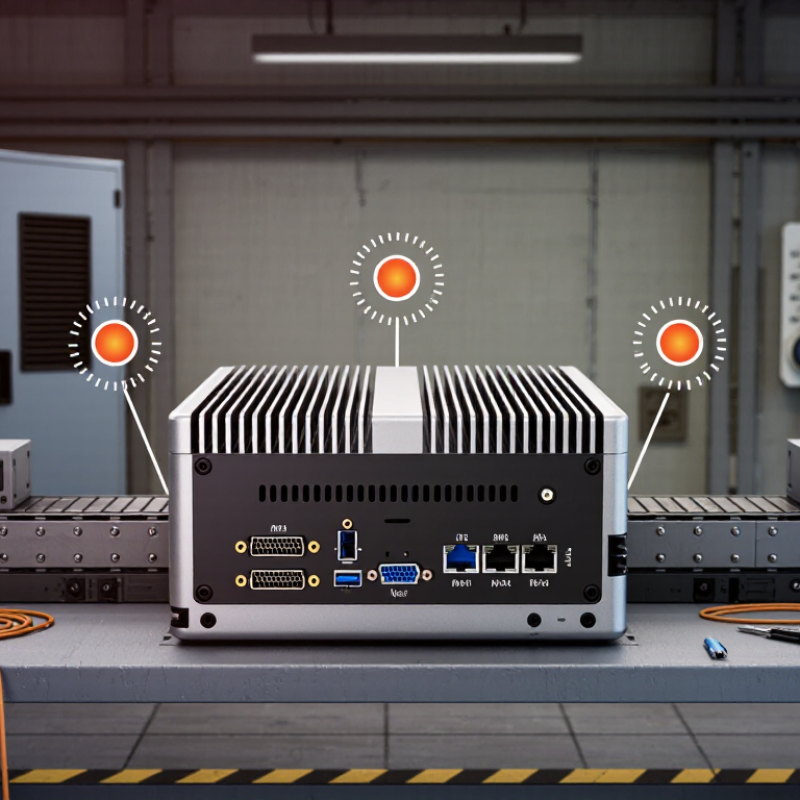
Assess the machine’s actual job before comparing processor speed or memory. A controller reading a few sensors needs different resources from a vision system processing several camera streams. Note required interfaces, data rates, and response times. Then observe the installation point: inside a sealed cabinet, beside a motor, or on a vibrating production line. Heat changes everything. A cabinet that feels cool in the morning may run much hotter after hours of operation.
Check the full temperature range, airflow, dust, moisture, shock, and vibration specified for the site. Compare those conditions with the computer’s documented ratings, not just a headline operating-temperature figure. Measure, don’t guess. Also verify supply-voltage variation, startup current, grounding, and exposure to electrical noise.
These details can reveal whether extra filtering, cooling, or a different mounting method is needed. Leave room for cables and service access; a compact unit is not useful if connectors become unreachable. A paper checklist can miss awkward realities, such as a blocked vent or a cabinet door that prevents maintenance. Record those observations, and test a representative setup under the conditions the computer will actually face.
Processing needs depend on what the computer actually does, not just the number of connected devices.
A panel displaying temperatures needs less CPU capacity than a system analyzing several camera feeds in real time. List each task, its update rate, and whether delays are acceptable. Measure real load. A useful test runs the intended software while recording CPU use, memory consumption, and response time.
Memory needs depend on the operating system, application, and data buffers. Leave room for background services and future software changes, but avoid choosing capacity by guesswork alone.
Heat changes the answer. A processor that looks fast on paper may slow down inside a sealed enclosure near motors or other warm equipment. Test the unit in a representative enclosure and workload.
One estimate may be wrong: field logs can reveal brief data spikes that a bench test misses. Also check whether memory is replaceable or fixed, since that affects maintenance and later upgrades.
A modest reserve is useful; excessive headroom can raise cost without improving performance.
An embedded industrial computer should match the signals and networks already present on the machine. Count each required Ethernet, serial, USB, and digital I/O connection, then check its electrical type and isolation needs. A sensor may use RS-485, while a camera needs stable Ethernet bandwidth. “Enough ports” is not a specification. Leave at least one practical path for service tools or future sensors.
Connectivity standards are changing quickly. HMS Networks’ 2024 Industrial Network Market Shares study estimates that industrial Ethernet represented 71% of newly installed industrial network nodes, compared with 22% for fieldbus and 7% for wireless. That supports checking Ethernet speed and protocol compatibility, but it does not make legacy interfaces disappear. The awkward detail: a plant may need both. Confirm whether the computer supports the required protocol directly or needs a separate interface.
Expansion matters when a project grows. Check available PCIe or M.2 slots, antenna connections, and whether adding a card blocks airflow or neighboring ports. A compact cabinet can turn a theoretically compatible card into a poor fit. Verify the full configuration, not just the base model: add-in cards can affect power draw, heat, and vibration tolerance. I/O plans often change late. Leave some headroom, but avoid paying for unused capacity.
| # | Selection Tip | What to Check | Practical Planning Guidance |
|---|---|---|---|
| 1 | Count every required I/O point | List digital inputs and outputs, analog channels, serial ports, USB ports, and display connections. Check signal type, voltage range, connector, and whether inputs or outputs need electrical isolation. | Make an I/O schedule from the attached sensors, actuators, drives, and displays. Include spare capacity for service changes; do not assume that a port described as “serial” supports every required electrical standard. |
| 2 | Match serial interfaces to field devices | Verify whether devices require RS-232, RS-422, or RS-485, and confirm port count, connector pinout, baud rate, and any half-duplex or full-duplex requirements. | RS-232 is commonly used for point-to-point links, while RS-485 supports differential signaling and multidrop networks. Check the device manuals and cable layout before choosing the computer’s serial hardware. |
| 3 | Plan network connectivity | Check the number and speed of Ethernet ports, required network separation, Wi-Fi or cellular needs, antenna connections, and supported protocols such as TCP/IP or industrial Ethernet protocols used by the installation. | Separate machine, supervisory, and service networks where the system design requires it. Confirm that port speed, network interface features, and protocol support match the switches, controllers, and software in use. |
| 4 | Confirm expansion options | Identify required PCIe slots, M.2 sockets, SIM slots, or other expansion interfaces. Check physical size, keying, lane or interface availability, card clearance, and whether an expansion module blocks adjacent connectors. | Choose expansion hardware around the actual add-on card or module, not just the socket name. For M.2 devices, verify key type and supported interfaces; an M.2 socket may support storage, wireless, or other functions depending on its wiring. |
| 5 | Check power and electrical protection | Compare the computer’s input-voltage range and power consumption with the available supply. Review surge, reverse-polarity, ESD, and isolation requirements for the installation environment. | Allow headroom for startup loads and connected peripherals. Use appropriate protection and grounding practices, and verify that the power supply and wiring meet the equipment and site requirements. |
| 6 | Match the operating environment | Check the specified operating temperature, humidity limits, shock and vibration ratings, enclosure protection, cooling method, and any required certifications for the location. | Compare specifications with conditions inside the intended cabinet or machine, not just the room temperature. Dust, restricted airflow, vibration, and heat from nearby equipment can affect reliability. |
| 7 | Verify mounting, service, and lifecycle needs | Confirm DIN-rail, panel, or other mounting options; connector access; storage and memory serviceability; operating-system support; and availability of replacement units over the planned service life. | Check clearances for cables and maintenance access before installation. Document the chosen configuration, supported software, and replacement requirements to simplify commissioning and future servicing. |
Specifications and interface capabilities vary by configuration. Confirm all electrical, mechanical, environmental, and software requirements against the equipment documentation for the intended application.
An embedded industrial computer may sit beside a hot motor, collect dust, and vibrate through every shift. A thick metal case alone proves little. Check the specified operating temperature, shock, and vibration limits, then compare them with measured conditions at the installation point. Leave margin for heat trapped inside a sealed cabinet; room temperature can be misleading.
Cooling needs evidence, too. ASHRAE TC 9.9’s 2021 Thermal Guidelines recommend 18–27°C inlet air for common data-center equipment classes. That range is a useful reference, not an industrial-computer rating. Confirm the unit’s own limits and test airflow with the enclosure closed. Fanless designs remove a moving part, but fins can clog with dust. I have seen “maintenance-free” become “hard to clean.” Not ideal.
For water and dust exposure, check the stated IP rating against IEC 60529, and inspect the connectors and cable entries—not just the enclosure. IP ratings do not establish resistance to corrosive gases or vibration, so request separate test details when those hazards matter. A gasket can look sound while a poorly routed cable creates an entry path. Ask for test conditions, duration, and pass criteria; vague claims of “rugged” are difficult to compare.
An embedded industrial computer is a lifecycle decision, not just a processor choice. Check how long the supplier commits to firmware updates, security fixes, and replacement parts. Ask for a written notice period before components become unavailable, plus a realistic repair turnaround. A spare unit on the shelf can matter more than a small discount. So can support for the operating system and interfaces already used on the line. Reliability claims deserve detail: request temperature, vibration, and power-loss test conditions, not just a headline rating. Then compare the data with the cabinet’s actual heat, dust, and maintenance access.
Total cost includes installation, energy, service calls, downtime, and planned replacement—not merely the purchase price. Uptime Institute’s 2024 Annual Outage Analysis found that 54% of respondents’ most recent significant outages cost more than $100,000. That survey concerns data centers, not factories, so it is a warning signal, not a plant-cost estimate. Ponemon Institute’s 2022 Cost of Data Center Outages study also estimated average outage costs at about $9,000 per minute. Treat that figure cautiously. Build your own estimate from production value per hour, recovery time, and available redundancy. It is easy to overvalue a low initial price. I would still challenge any spreadsheet that assumes zero failures; real maintenance rarely follows the tidy plan. Compare options over the same service period, and include the cost of keeping compatible spares.
Compare Lifecycle Support, Reliability, and Total Cost
How to read this: Illustrative five-year planning estimates in USD per device—not market quotes. Total cost combines hardware, integration, support, and expected downtime. Compare the assumptions with your own service life, operating conditions, and support requirements before choosing a system.
This is an example of a widget area that you can place text to describe a product or service. You can also use other WordPress widgets such as recent posts, recent comments, a tag cloud or more.
© 2025 International Fluid Power, Inc. All Right Reserved.