Why Use Optical Cable Adapters for Fiber Networks?
Why Use Optical Cable Adapters for Fiber Networks?
In a fiber network, small connection points can determine overall reliability. Optical Cable Adapters join compatible fiber connectors inside patch panels, wall outlets, and distribution boxes. They keep ferrules aligned with remarkable precision. That alignment helps light pass between cables with lower insertion loss and fewer signal reflections.
A practical installation makes their value easy to see. In a crowded rack, an adapter provides a stable port for connecting and replacing patch cords. Technicians can identify LC, SC, or ST interfaces quickly. They can also protect unused ports with dust caps. This matters because one tiny particle can affect an otherwise clean optical path.
Good adapters support organized maintenance. They simplify testing, troubleshooting, and future network changes. However, they are not a cure for poor cabling. Compatibility, end-face quality, alignment sleeves, and connector polish still matter. A reliable technician checks specifications before installation and measures loss after connection. Standards and manufacturer data should guide that process.
The details matter.
In my experience, a loose adapter may look acceptable while causing intermittent performance. That problem is easy to overlook during a rushed upgrade. Regular inspection helps, though inspection alone cannot replace proper testing. Choosing quality Optical Cable Adapters can reduce unnecessary replacements and protect network stability. Their design seems simple, but dependable fiber communication often depends on simple parts working precisely.
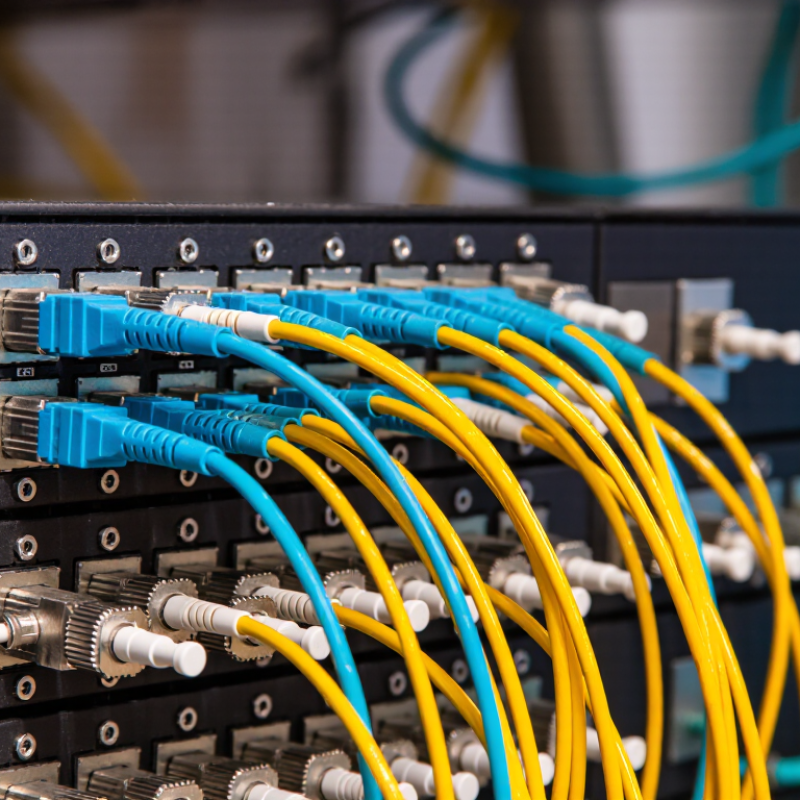
What Optical Cable Adapters Are and How They Work
Why Use Optical Cable Adapters for Fiber Networks?
Optical cable adapters are small alignment components used to join two fiber connectors. They do not strengthen the optical signal. Their job is more precise: they keep two polished fiber ends centered and firmly connected. Inside each adapter, a ceramic or metal sleeve guides the connector ferrules. The sleeve limits movement, while the housing holds the connection in a patch panel, wall outlet, or splice enclosure.
Common adapter types match connector shapes and locking methods. Simplex versions support one fiber, while duplex versions support two. Single-mode and multimode systems may use different connector polishing styles. For example, an angled polished connector should not be casually paired with a flat polished connector. The connection may fit physically, but reflection performance can suffer. Small details matter here.
During installation, technicians should inspect both connector ends, remove dust caps carefully, and clean the end faces before mating. A faint click is useful, but it does not prove a low-loss connection. Adapter alignment can reduce movement, yet damaged ferrules or contaminated sleeves still create insertion loss. It is easy to blame the adapter first. That assumption is often wrong. Testing with a power meter and light source gives a more reliable result, especially after repeated reconnections.
Why Use Optical Cable Adapters for Fiber Networks? - What Optical Cable Adapters Are and How They Work | Adapter Type | Connector Interface | How It Aligns Fibers | Common Applications | Important Compatibility Notes |
| SC adapter | SC to SC | A precision alignment sleeve holds the connector ferrules in line so their fiber cores meet. | Patch panels, distribution frames, and equipment connections in single-mode or multimode networks. | Match the fiber mode and connector polish. UPC and APC connector end faces should not be mated together. |
| LC adapter | LC to LC | A small alignment sleeve centers the 1.25 mm ferrules used by LC connectors. | High-density patch panels, switches, and transceivers where space is limited. | Check whether the adapter and connectors are simplex or duplex, and confirm the required polish type. |
| ST adapter | ST to ST | An alignment sleeve positions the ferrules; the bayonet-style connector coupling secures the connection. | Some legacy multimode installations, including older campus and industrial networks. | ST connectors use a different coupling style from SC and LC, so a matching interface is required. |
| FC adapter | FC to FC | A precision sleeve aligns the ferrules, while the threaded coupling holds the connectors firmly in place. | Test equipment and applications that benefit from a secure, threaded connection. | Verify the connector polish and keying. The threaded FC interface is not interchangeable with bayonet or push-pull interfaces. |
| MPO adapter | MPO to MPO | Guide pins and alignment holes position the multi-fiber connector ferrules; the adapter housing maintains their alignment. | Multi-fiber trunks, data-center cabling, and high-density parallel-optics links. | Check pin configuration, fiber count, polarity, and connector type. Pinned and unpinned connectors must be appropriately paired. |
| Hybrid adapter | Two different connector interfaces | Separate alignment features match the ferrule geometry on each side of the adapter. | Connecting equipment or patch cords that use different connector formats. | Confirm that the specific connector combination, fiber mode, and polish are supported; hybrid adapters do not convert optical signals. |
Key Functions of Adapters in Fiber Network Connections
Optical cable adapters, often called fiber couplers, align two connector ends with remarkable precision. Their key function is simple: maintain the fiber cores on the same optical path. A ceramic sleeve inside the adapter reduces lateral movement, while the housing protects the connection from dust and accidental contact. This matters as networks expand. The International Telecommunication Union reported 5.4 billion internet users in 2023, increasing pressure on stable access infrastructure.
Adapters also support network flexibility. Technicians can connect patch cords, distribution panels, and equipment without splicing every fiber permanently. Different interfaces can be managed through suitable adapter designs, but compatibility must be checked carefully. Connector polish, fiber mode, alignment sleeve material, and end-face cleanliness all affect insertion loss. IEC 61753-1-1 provides performance classifications for passive optical interconnections, while TIA-568.3-E defines testing practices for balanced fiber cabling. Practical installations often target a mated connection loss below 0.5 dB, although the actual value depends on components and workmanship.
Small parts create large consequences.
A scratched end face can weaken the signal. Loose mounting can increase reflection and intermittent faults. In field work, cleaning and inspection should happen before every connection, not only after problems appear. This is where specifications meet experience. Adapters rarely fail dramatically; they usually add gradual loss that engineers overlook. That assumption deserves review, especially in high-density panels and long links with limited power margins.
Benefits of Using Optical Cable Adapters
Why Use Optical Cable Adapters for Fiber Networks?
Benefits of Using Optical Cable Adapters
Optical cable adapters align two fiber connectors with precision. They support stable links during network expansion, repairs, and equipment changes. ITU’s Facts and Figures 2023 reported 5.4 billion people online, representing 67% of the global population. That growth increases pressure on access, data center, and backbone networks. Small parts matter.
Adapters also reduce installation complexity. Technicians can disconnect a patch cable without replacing an entire fiber assembly. This supports faster troubleshooting and cleaner cabinet management. Properly matched adapters help control insertion loss and preserve signal quality. However, adapters cannot correct poor splicing, damaged connectors, or excessive bending. That assumption deserves reconsideration. The FTTH Council Global Alliance’s 2024 market report described continued fiber deployment across both mature and emerging markets, making modular connectivity increasingly practical.
Tips: Match connector types carefully, including LC, SC, and MPO configurations. Never mix APC and UPC polishing without checking system requirements. Inspect ferrules before connection, then clean them with approved lint-free tools. Keep unused ports capped. A small dust particle can disrupt a high-speed link. Record adapter locations during installation. This simple habit shortens future maintenance. Field experience also shows that cheap-looking hardware is not always weak, but undocumented components create uncertainty. Check specifications, test insertion loss, and leave room for inspection.
Common Types and Compatibility Considerations
Why Use Optical Cable Adapters for Fiber Networks?
Optical cable adapters align two fiber connectors with precision. They support network expansion, repairs, and equipment changes without replacing complete cable runs. Common types include LC, SC, ST, and FC adapters. Simplex adapters connect one fiber, while duplex adapters connect a paired link. Multi-fiber systems often use MPO-style adapters for dense data center connections. Each design has a specific latch, sleeve, and alignment method.
Compatibility requires more than matching connector shapes. Single-mode fiber should use single-mode components, while multimode fiber needs matching multimode adapters and cables. Polish types also matter. UPC and APC connections should not be mixed, even when the connector body looks identical. Adapter performance depends on core alignment, sleeve quality, and insertion loss. IEC interface standards can help confirm connector dimensions, but product documentation remains essential. Color coding helps. It is not proof.
During installation, I check connector labels, fiber type, polish, and port polarity before inserting anything. A connector may fit physically and still create high signal loss. Dust is another quiet problem. One particle can weaken a link that passed earlier testing. I prefer cleaning both end faces and measuring insertion loss afterward. I have occasionally trusted a familiar connector shape too quickly; that assumption caused avoidable troubleshooting. Compatibility charts are useful, but they cannot replace an actual power-meter reading in a live network.
Why Use Optical Cable Adapters for Fiber Networks?
Optical cable adapters provide precise alignment between connector ferrules, helping maintain low-loss and reliable fiber connections. The chart compares common adapter interfaces by their typical fiber positions: simplex connector families normally support one fiber, while MPO interfaces commonly support 12 or 24 fibers. Compatibility depends on connector family, ferrule size, keying, gender, polish type, and fiber mode.
How to Choose and Install the Right Adapter
Choosing the right optical cable adapter starts with matching the connector type, fiber mode, and polish. SC, LC, and ST plugs do not fit the same sleeves reliably. UPC and APC end faces should not be mated together; their angles differ. Check whether the link is single-mode or multimode, then confirm simplex or duplex layout. A mismatch can cause excess loss, reflection, or an intermittent link. Small part. Big impact.
Scale makes careful selection more important. The Fiber Broadband Association and Cartesian reported that U.S. fiber passed 77.1 million homes in 2022, a 12.5% annual increase. For expanding networks, standardize adapter types within each panel where possible, and label both ends before installation. Use a compatible, rated adapter; avoid forcing a connector into its sleeve. Clean the ferrule with approved tools, inspect it, and keep dust caps on until connection. Even a tiny speck can impair the optical path.
During installation, seat the adapter squarely in the panel and secure its retaining clips or screws. Align connector keys, then insert each plug gently until it clicks or seats firmly. Never twist a keyed plug to make it fit. Measure insertion loss after changes, especially on long or high-speed links. I still see teams skip inspection when work is rushed. That shortcut is hard to defend. A test record also helps locate later faults.
